
New Media
You can register for all workshops in MyCampus
IN DEN SEMESTERFERIEN SELBSTÄNDIGES ARBEITEN NACH VORHERIGER ABSPRACHE!
WINTERRSEMESTER 2026/27
Einführung in die Studienwerkstatt Neue Medien und Medienpädagogik
Freitag 30. Oktober 26, von 11-12h, Raum E.O3.10 - bitte im MyCampus anmelden.
Der Nachweis einer Einführung in die Studienwerkstatt ist Voraussetzung für deren Nutzung wie auch für die Teilnahme an den Workshops und für den Verleih von Geräten.
Die Einführung muss nur einmal während der Studienzeit gemacht werden.
Dein digitales Portfolio – Inhalt & Präsentation (nur noch Warteliste)
Donnerstags 10.00–13.00 Uhr, Beginn: 22.Oktober (Vorbesprechung),
weitere Termine in MyCampus (insgesamt 9 Termine)
Dozentinnen: Iska Jehl und Dr. Susanne Witzgall
Ein Portfolio ist sowohl bei Bewerbungen um ein Stipendium oder eine Projektförderung, als auch bei der Kommunikation mit Kurator*innen oder Galerist*innen unabdingbar und nicht selten entscheidend. Doch wie erstelle ich ein Portfolio, das meine Arbeiten von ihrer „besten Seite“ zeigt sowie für Jurymitglieder und Kurator*innen auch in kurzer Zeit gut erfassbar ist und weiteres Interesse weckt? Wie schreibe ich ein prägnantes Artist Statement für dieses Portfolio? Was ist bei Layout, Bildauswahl und Fotoqualität zu beachten? Welche Arbeiten und Ausstellungen führe ich auf und welche lasse ich lieber weg? Wie strukturiere ich Bilder und Texte? Wie erstelle ich mit Affinity Publisher und Affinity Photo ein professionelles PDF für eine digitale Einreichung?
All dies sind Fragen, die wir in diesem praxisorientierten Workshop gemeinsam angehen wollen. Der Workshops umfasst konkrete inhaltliche und technische Anleitungen inklusive Software-Schulungen und bietet darüber hinaus einen Raum für gemeinsame Diskussion und konstruktive Kritik, um ein eigenes aussagekräftiges und übersichtliches Portfolio zu erarbeiten.
Photoshop für Einsteigerinnen (m/w/d)
Fr. 20., Fr. 27.November, Fr. 04., Fr. 11. Dezember von 12-15h
Teilnehmerzahl: 8
Dozentin: Claudia Badouin
In diesem Workshop lernst du die wichtigsten Photoshop-Grundlagen und setzt sie direkt in kleinen praktischen Übungen um.
Du lernst Bilder freizustellen, zu korrigieren und zu retuschieren – auch mit generativer KI.
Du arbeitest mit Ebenen, Auswahlen und Ebenenmasken.
Du erfährst, was es mit Bildauflösung, Bildgröße, Farbprofilen und Farbräumen auf sich hat.
Abschließend lernst du die wichtigsten Dateiformate für Druck und Web kennen.
Layout mit AFFINITY STUDIO
Mi. 02., Do. 03. und Di. 08. Dezember von 10-14h
Teilnehmerzahl: 10
Dozentin: Doris Würgert
In diesem Kurs werden die Grundlagen und wichtigsten Funktionen von Affinity „Layout“ vermittelt. Ziel ist ein einfacher, sicherer Umgang mit dem Programm zur Erstellung eigener Druckerzeugnisse.
Bitte bringt eigene Bilder mit, um das Gelernte direkt in einer kleinen Broschüre anzuwenden.
Recording - "Pssst" - Aufnahme läuft
Mi. 20. und Do. 21. Januar 2027 jeweils 10-16 Uhr, Nachbesprechung Mi. 27. Januar 2027
Teilnehmerzahl: 8
Dozent: Raimund Ritz
An zwei Tagen werden Grundlagen aus dem Bereich Audio / Recording vermittelt.
Von Sprach- über Musikaufnahmen, erstellen von O-Ton für Film, das Mischen der verschiedenen Tonspuren,
Strategien für Klanginstallationen: wir machen und probieren!
Gerne schon eigene Projektideen mitbringen!!
Videoschnitt - FINAL CUT - Basics
Di. 10. und Di. 17. November 2026 jeweils 10-13 Uhr, weitere Termine möglich
Teilnehmerzahl: 8
Dozent: Hubert Sedlatschek
FINAL CUT PRO X ist von Apple und nur für Apple Computer verfügbar. Trotz dieser Einschränkungen ist diese professionelle Videoschnittsoftware der wohl einfachste Einstieg in die Materie. Wir schauen nach link und rechts - was ist mit Premiere und warum nutzen wir nicht einfach Shotcut? Wir werden es heraus finden!
Raum: E.O3.10
Voraussetzung: Solide Kenntnisse in OSX wären schon praktisch.
Meta Flesh – Reale Avatare vol. 2 Worldbuilding
Worldbuilding zwischen Body Horror, Backrooms und virtuellen Mythologien
Do. 04. Februar und Fr. 05. Februar 2027 von 11-17h
Teilnehmerzahl: 12
Dozent: Alexander Scharf
META FLESH – REALE AVATARE Vol. 2 untersucht virtuelle Welten als gesellschaftliche, politische und künstlerische Erfahrungsräume. Im Zentrum stehen die Beziehungen zwischen Körper, Avatar, künstlicher Intelligenz und virtuellen Gemeinschaften sowie Prozesse der Verkörperung, Transformation und Identitätsbildung in virtuellen Räumen des Umbruchs.
Ausgehend von liminalen Räumen und ludischen Methoden entwickeln die Studierenden in einem gemeinsamen Worldbuilding-Prozess einen spekulativen Kosmos als Grundlage für eigene künstlerische Arbeiten. KI-Systeme, algorithmische Eigenlogiken, KI-Halluzinationen, Glitches und virale Informationsformen werden dabei als zeitgenössische Formen des Unheimlichen untersucht.
Theoretische Impulse aus Technofeminismus, Medientheorie, Gaming-Kultur und Body Horror, unter anderem von Donna Haraway, Legacy Russell und Helen Hester, werden mit experimenteller Projektarbeit verbunden. Installation, Video, Skulptur, Games, KI, Sound und VR können frei kombiniert und werden mit einer Einführung in die Unity Software unterstützt.
Das Seminar umfasst theoretische und praktische Einheiten, Werkstattgespräche und individuelle Konsultationen. Ziel ist die Entwicklung eigenständiger künstlerischer Positionen innerhalb eines individuellen Worldbuildings sowie deren abschließende Präsentation.
Room
E.O3.01, Akademiestr. 4
Contact
+49 / 89 / 3852 -184
Staff Member
+49 / 89 / 3852 -226
Consultation-Hours: on appointment
Student Staff
Madeleine Ritter:
Gabriele Pereira Winter:
Veronika Gebhard
Benjamin Laabmayr
Assistent Lecturers
- Claudia Badouin, digital picturer editing, layout
- Raimund Ritz, digital audio
- Doris Würgert, layout
- Alexander Scharf, Meta-Verse
- Johannes Karl, animation
PRINTING SERVICE DURING THE SEMESTER
Printservice during the semester: coming soon
The person in charge: Gabriele
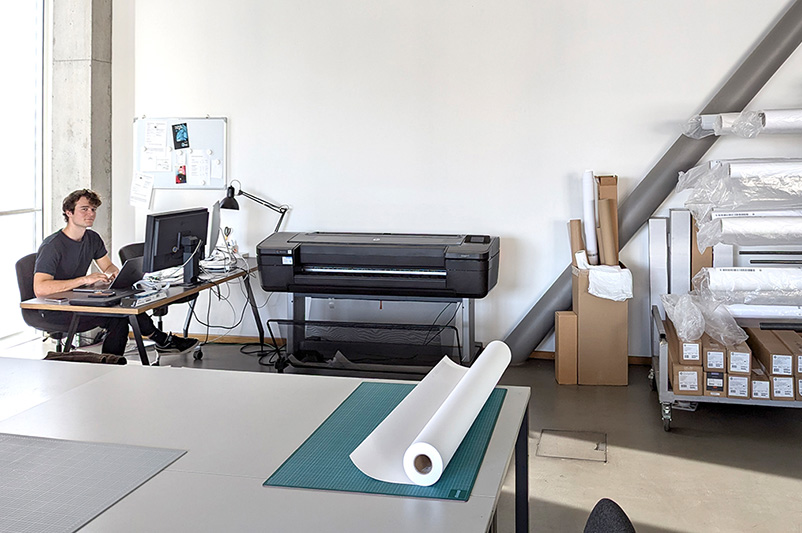
We print gallery-quality colour and black-and-white prints on an HP Designjet Z9 with a light resistance of up to 200 years.
The printer has 9 colours. You can print with a maximum width of 110 cm and a maximum length of 1000 cm.
BASICS FOR PRINTING
- Printing is only available for students and staff of the Academy of Fine Arts Munich.
- We only print on paper rolls.
- Printing on your own paper and with single sheets is not possible!
- Please bring your files with 150-200 DPI in RGB.
- If you have several small pictures on one printed sheet please prepare the file with the right width (for example. 110cm width). See the paperlist further down for the right width.
- Only JPG, TIFF or PSD-files.
The printer is in room E.O3.10.
PRICES
-
- HP Universal Bond Paper 80 g , Rollenbreite:105 cm, price/sqm: 15 €
- HP Heavyweight Coated Paper 130 g, Rollenbreite: 105 cm, price/sqm: 18 €
- HP Super Heavyweight Plus Matte 200g, Rollenbreite: 105 cm, price/sqm: 25 €
- HP Litho Realistic Paper 260g, Rollenbreite 110 cm, price/sqm: 25 €
- HP Everyday Instant Dry Gloss Paper 260 g, Rollenbreite: 105 cm, price/sqm: 25 €
- HP Everyday Instant Dry Satin Paper 235 g, Rollenbreite: 105 cm, price/sqm: 25 €
- HP Professional Artist Matte Canvas 390 g, Rollenbreite: 110 cm, price/sqm: 32 €
- HP Premium Vivid Color Backlit Film 285 g, Rollenbreite: 105 cm , price/sqm: 30 €
Basic computer knowledge is a prerequisite for self directed work at the computers. Basics are taught in the introductory course in the beginning of each semester.
ONLY STUDENTS WHO HAVE PARTAKEN IN THE INTRODUCTORY WORKSHOP ARE PERMITTED TO USE THE STUDIO
NO PRIVATE REPAIR AND NOT PRIVATE BUYER'S GUIDE!
Only students who have partaken in the introductory workshop are permitted to use the studio space or rent the equipment available at New Media. An introductory workshop is held to give general knowledge of the studio. Students may register for this workshop at the beginning of each semester. Student work should be backed up onto personal hard drives, CDs, DVDs, hard drives, or internet server accounts. Hard drives at every workstation are erased regularly. For large projects, it is possible to borrow an external hard drive for the duration of the project. However, students must remember to leave enough time to apply for one beforehand.
1. General Rules
- The workshops are for fully enrolled students at the Academy of Fine Arts, Munich. Exceptions may be made by the workshop lecturer for guest students.
- Teaching staff are responsible for the coordination and management of the workshops.
- The staff must be consulted before work begins on a proposed project. In approving a project, they are agreeing to be available during the project for consultation (help or advice).
- Any violation of New Media workshop regulations will result in limited or revoked use of the study space.
2. Obligations of Participating Students
2.1. The following must be observed in order to avoid accidents and damage to health. Please observe the following rules:
- Follow the instructions of the people in charge of the New Media Studio
- Anyone under the influence of drugs, alcohol, narcotics, or paraphernalia are prohibited at the New Media studio.
- Students must behave in a manner that does not harm themselves or others
- Machinery, work tools, and equipment must be checked to ensure they are in proper working condition before used. Any defects must be reported as soon as they are found to the person in charge.
- One must make arrangements with the staff to take New Media equipment outside the workshop area before doing so.
2.2. The following will lead to having privileges immediately revoked at New Media:
- Illegal copying of DVDs, CDs and software
- Manipulation of operating systems and user authorisations
- Accessing websites with illegal content
- Using the internet for transferring illegal data (downloading hacked programs, etc.)
- Installing unauthorised programs of any kind
- Manipulating or deleting data of any kind
2.3. Order and Cleanliness
- Eating, drinking, or bringing pets into the studio is not permitted
- All students in workshops are required to maintain order and cleanliness in their workspace. When workshops are over, students must make sure to cleanup after themselves and completely clear their space.
- Do not block or get in the way of fire-extinguishing equipment, electrical dividers, walking paths, exits, or emergency exits.
3. Occupational safety and health habits
Any unauthorised changes made to wiring is dangerous and therefore is prohibited. Any equipment that carries an electrical current must never come into contact with liquid. Laser products may not be opened (such as CD and DVD drives, and laser mouses). While working, it is important to maintain good posture and to avoid reflections from monitors. Regular breaks are crucial when sitting down for long periods of time. Eight minute breaks are ideal after sitting in front of the computer screen for hour-long sessions. Walking around increases increases oxygen flow, which improves one’s ability to concentrate.
4. Protocol in the event of an accident
- Depending on the severity of the injury, the local emergency medical services should be called. The injured person should be brought to the nearest doctor or emergency room in the nearby hospital, or, the charge of the study workshop area first responders. Schwabing: 24 hour Hospital at Kölner Platz 1, 80804 Munich is responsible for treating students of the Academy of Fine Arts
- All injuries, even those that do not require medical treatment, must be reported to the study workshop manager.
- All accidents must be reported and documented by the study workshop manager to the academy’s administrative department.
5. Fire Safety Fire safety instructions must be observed.
6. Work Prohibition
- The study workshop manager will be the one who decides when someone is banned and when someone is allowed access again to the study workshop.
- Regarding employment restrictions, the applicable legals actions are as follows:
Former students and others:
The studio workshop is only available to students and staff of the Academy. Former students and all other people are not allowed use of the study workshops.